
Video walkthrough
Overview
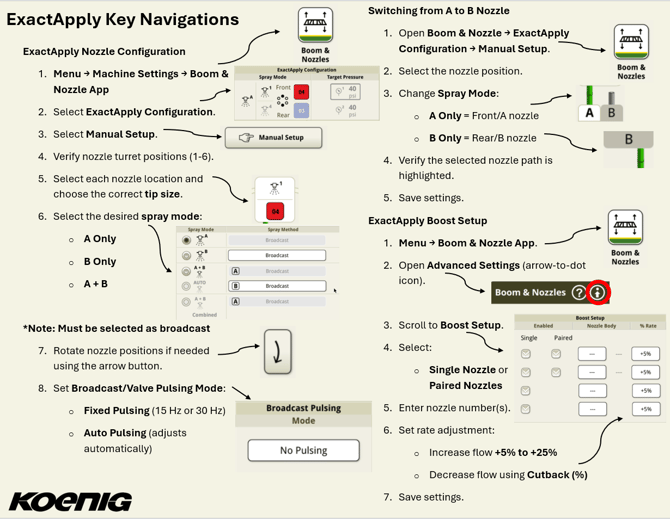
ExactApply lets you control how product flows through your sprayer nozzles, including which nozzle circuits are active, how the solenoids pulse, and where you want to boost or cut back flow. This guide covers three tasks: nozzle configuration, switching from the A to the B nozzle, and ExactApply Boost setup. The first two sections follow the video walkthrough; the Boost setup section is drawn from the written quick-reference guide referenced in the video description for when you are ready to fine-tune rates by nozzle.
Before you begin- Make sure your display is powered on and running.
- Confirm your sprayer is equipped with ExactApply (individual nozzle solenoid control).
- Each turret has six nozzle positions. Knowing which positions feed the front (A) versus the rear (B) circuit will help you choose the correct spray mode.
- Select the Menu button under Machine Settings and open the Boom & Nozzles app.
- In the Boom & Nozzles menu, select ExactApply Configuration.
- Select Manual Setup (bottom-left). This opens the Nozzle Turret settings.
- On the left, review how your nozzles are positioned on the machine. For example, position 1 may be front-middle, and position 4 may be at the rear.
- Select the box under a nozzle and choose the correct tip size. Choose from a Recent list or the All list. If the nozzle is not listed, pick the generic size for normal spraying.
- Select the desired spray mode:
- A Only (front / A nozzle)
- B Only (rear / B nozzle)
- A + B (both nozzles)
When A is selected, the green flow pipes connect only to the A nozzle. Selecting B shows flow to B only. Selecting A + B highlights both A and B in green.
- If needed, rotate nozzle positions using the arrow button. The spray method options are A Only, B Only, and A + B. The available selection may vary based on position: if positions 1, 2, and 3 are in the front, you can spray from A or B; if positions 4, 5, and 6 are in the front, you can only spray A + B because they both feed into the front.
- Set the Broadcast/Valve Pulsing Mode (labeled Broadcast Pulsing Mode on some displays). Options include:
- No Pulsing: sprays conventionally.
- Auto Pulsing: pulses automatically.
- Fixed Pulsing: choose a set rate such as 15 Hz or 30 Hz.
Pulsing lets you hold a target pressure across different speeds to improve spray efficacy and reduce drift. Pulsing also enables features like turn compensation.
Part 2: Switching from the A to the B nozzle- Open Boom & Nozzle, then ExactApply Configuration, then Manual Setup.
- Select the nozzle position.
- Change the Spray Mode:
- A Only = front / A nozzle
- B Only = rear / B nozzle
- Verify that the selected nozzle path is highlighted (green indicates active flow).
- Save your settings.
This section is based on the written quick-reference guide linked in the video description. Use Boost to increase or cut back flow on specific nozzles.
- Open Menu, then the Boom & Nozzle app.
- Open Advanced Settings.
- Scroll to Boost Setup.
- Select Single Nozzle or Paired Nozzles.
- Enter the nozzle number(s).
- Set the rate adjustment:
- Increase flow in +5% steps up to +25%.
- Decrease flow using Cutback (%).
- Save your settings.
- Green pipes in the nozzle turret view indicate active flow. Use them as a quick visual check that the correct nozzle circuit is selected.
- If a nozzle is not listed, pick the generic tip size for standard spraying.
- Position matters: rotating the nozzle turret changes which spray modes are available. Front-positioned nozzles (1, 2, 3) can run A or B; rear-positioned nozzles (4, 5, 6) can only run A + B because both feed the front.
- Pulsing (Auto or Fixed) is what enables turn compensation and helps maintain consistent droplet quality across varying speeds.
If you want help confirming your nozzle configuration or setting up ExactApply Boost for a specific field, contact Koenig Equipment. Our team can walk through your setup and make sure your sprayer is dialed in before you head to the field.